The tour
Everything Graview derives from one declaration, running.
One feature per section, each beside a live frame of the example garden opened at the place that proves it, then the garden grown a step at a time. Nothing here is a screenshot. To start one of your own, hand your agent the prompt on the front page.
The routed face
An ordinary web app, for free. Or entirely in your own design.
The same declaration that draws the city also produces a routed web application: a home page, a list per kind, a record per thing, a form per action, and a problems page — at phone width, with nothing to write.
- Replace one page or all of them. Keep the derived pages you like and design the rest. The store, the actions and the rules stay underneath either way.
- Both faces, one address. Every record has a place on the map and a page on the web. A link goes to whichever a person needs.
- Mount it anywhere. The scene, the city or the pages inside any element of somebody else's site, themed within it.
The pages, loading…
Livethe example's pages, redesigned as an almanac over the same store
Rules that repair
A rule is not an error message. It is a problem with a way out.
A rule in Graview names the actions that would fix what it finds. When one is broken, the interface says so in a sentence and offers the repair as a button — to a person, or to an agent — instead of refusing a save and leaving somebody to guess.
- Rules are data. They live on the map like anything else, can be adopted, declared and read, and travel with the declaration.
- The checker reads them too. A rule that names an action nobody declared is caught before the page ever loads.
- Nothing fails in silence. A problem is a count in the corner, a card on the map, and a page of its own.
The rule, loading…
Liveone rule, one problem it found, and the repair it names — press the problem
Lenses
A calendar written for a rota works, unchanged, over a garden.
A lens is a picture with a rule for where things go: a week, a month, a board, a matrix, a plan. Lenses bind to roles — what starts, what ends, what belongs where — rather than to your field names, so one written for a domain the kit has never seen works in yours the day you declare which field plays which role.
- Six ship with it. A timeline, a calendar, a coverage matrix, a board, a status board in columns and a plan — each with drag, keyboard and a screen reader in mind.
- Write your own. The kit scaffolds a lens with its reuse test already written, red until the lens really does rebind.
- Every lens is a place. On the map, a lens stands on its own plot with the things it draws around it.
The rota's week, loading…
Livethe calendar lens where it was written: a volunteer rota's week
The season, loading…
Livethe same lens, unchanged, over what is in a garden's ground
The coverage matrix, loading…
Livea second lens, the coverage matrix — written for a tender response, here over who tends what
Built for a person and a model
Your agent gets the same buttons you do. No more, no less.
Every action in the declaration is also a typed tool with a sentence attached, narrowed by the same permissions a person is under. A model works the same graph, in the same log, and what it proposes is a plan you read before it lands — one batch, one undo.
- AI where the thing is. Right-click a record for what a model picks from the acts, places and panels the app already has; press ⌘K to ask about what you have selected. The answer stands on a card beside it, and a change it proposes waits as a ghost until you accept it — one batch, one undo.
- Readable from the outside. The kit describes the whole application in words for something that cannot see it, and writes the files an assistant reads.
- Thirty-one skills ship with it. Each teaches an assistant one shape of the declaration and ends by running the checker and reporting what it said.
The same seat, from a chat: on Graview Cloud, ChatGPT or Claude works in your app with your permissions, and every change it makes is labeled as made for you.
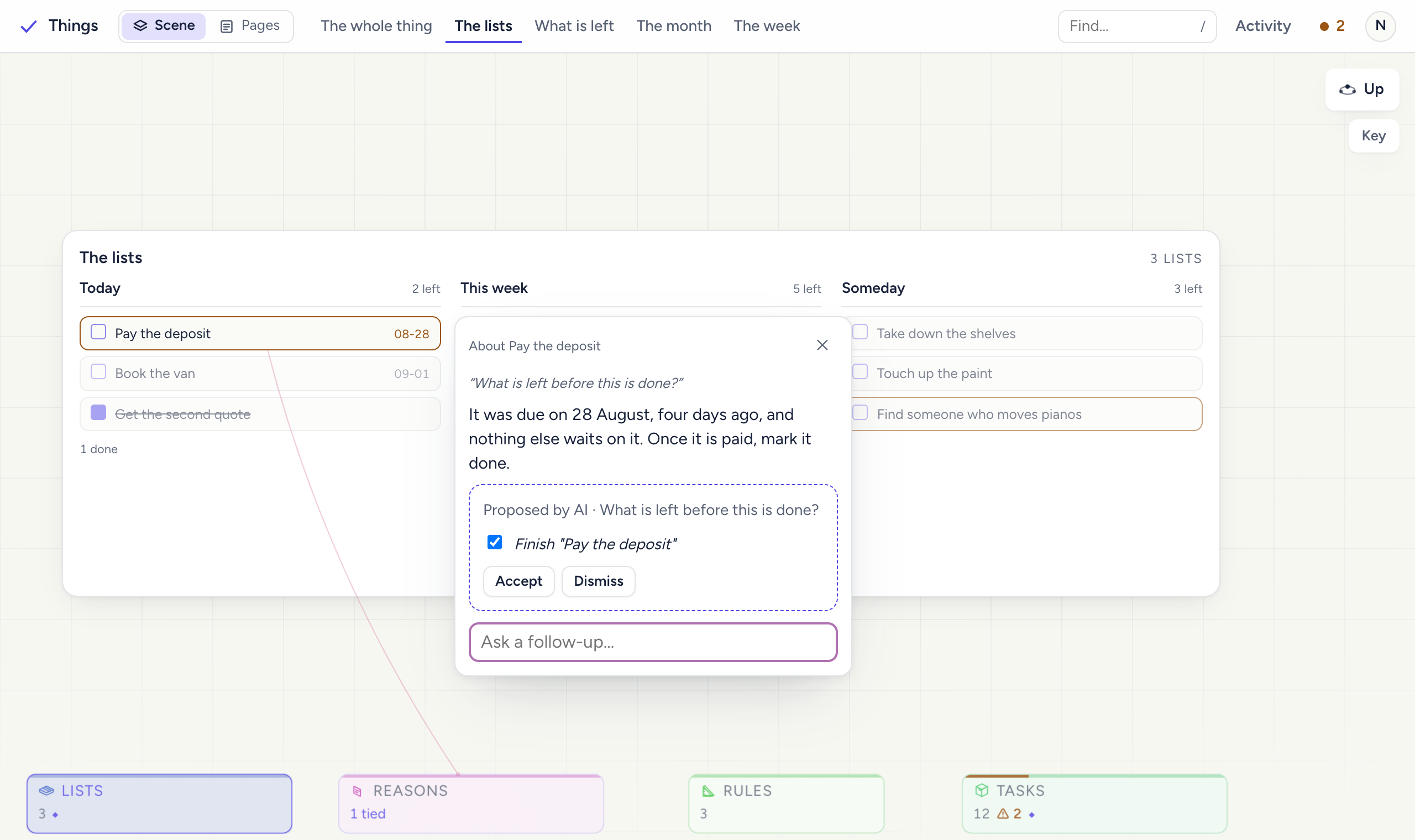
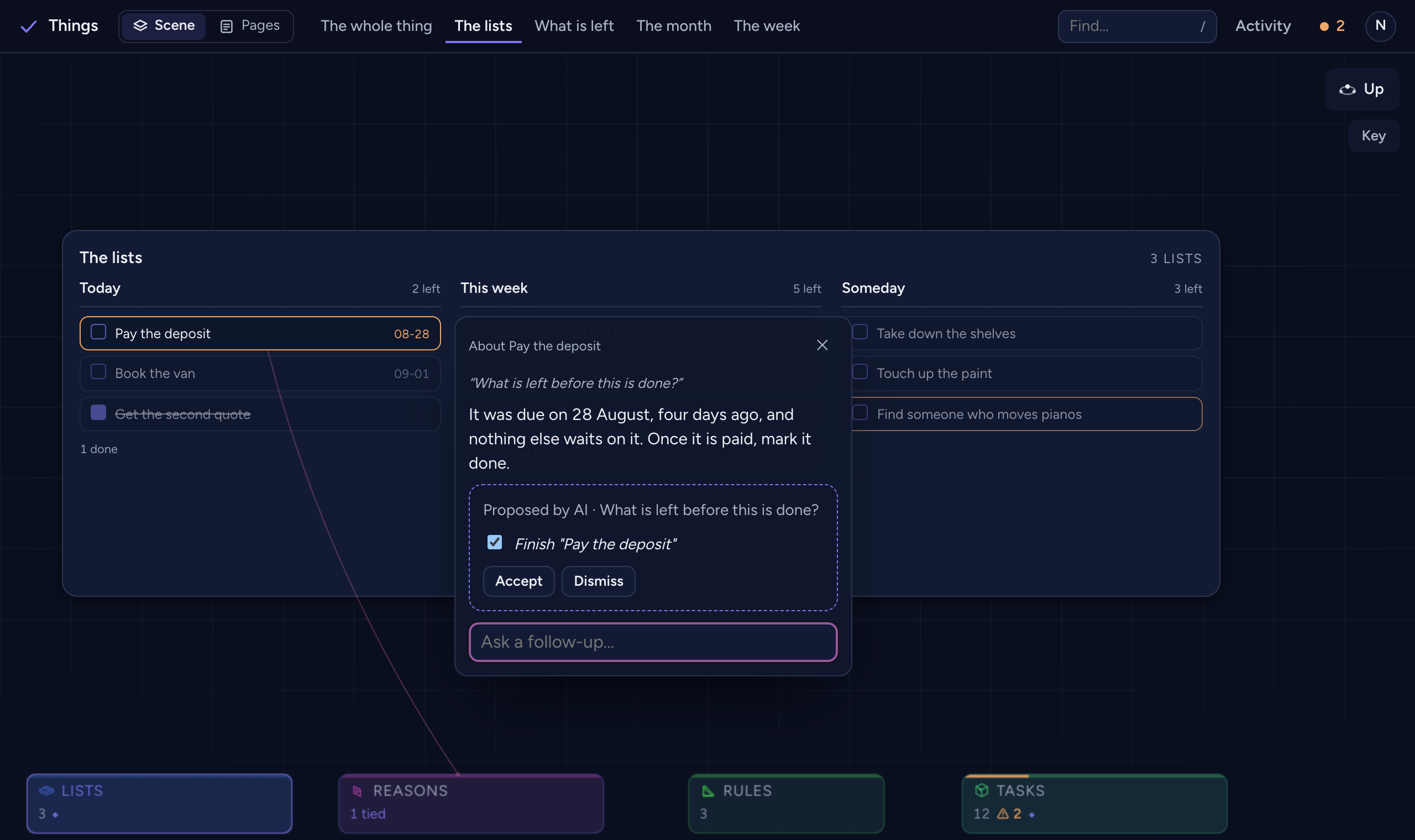
The garden, loading…
Livean agent's seat, in Activity — the same acts a person has, in the same log
The studio
The declaration is itself a graph. Edit it in the same interface.
Open your product's declaration in Graview's own interface: kinds, fields, relations, actions, rules, roles and grants become districts and buildings of their own. Change them with ordinary actions, let the checker judge the change before it applies, migrate the stored data, and write the files back.
- Same interface, one level up. A person who can use the product can change the product.
- Checked before it lands. Every edit is judged the way the build would judge it, in the studio, with the reason in words.
- Migrations are data. A stored graph follows the declaration through the same operation log it always used.
The studio, loading…
Livethe example's declaration, as a city of kinds, fields, acts and rules
Actions and permissions
What you can press is what you can see.
Select a thing and the actions it allows appear, ranked, with the destructive ones last. Declare who may do what once, and the buttons, the pages and the agent's tools all narrow from it. An action a role may not take is struck through with the sentence saying who can — never a button that silently fails.
- History you can read. Every change is an operation with an author and an intent. Undo one out of order, and the log says what blocks it if something does.
- Presence. See who is here and where they are working, in the product people actually open.
- Accessible by construction. Every view is exposed by name, the keyboard reaches all three planes, and axe-core reports nothing on every push.
The garden, loading…
Liveone plot selected: its acts ranked, its ties drawn, and the ones this seat may not take struck through — change seats above it
Watch it grow
Add a declaration. Watch the application follow.
One example — a community garden — declared a little at a time. Press a step. The left says what was declared; the right is the application, running on this page, at exactly that point.
One kind, one action. The city, the district, the form and the routed pages all exist before a line of interface is written.
- A plot: a patch of ground with a number of beds
- One action: stake out a plot
Loading the garden at step 1…
A rule lands on the map and names its own repair. The moment it does, an untended plot is a problem with a one-press fix, not a bug report.
- Gardeners, and who tends which plot
- A rule: every plot has a caretaker
- The repair it names: tend a plot
Loading the garden at step 3…
An agent gets the same actions a person does, through one declared seam. Its turn is attributed in the log, watchable from altitude, and undoable out of order.
- A seat: which actions a model may take
- How words reach it, and what it may not do
Loading the garden at step 5…
The same declaration is also an ordinary web application: lists, records, forms and problems, routed, at phone width. Any page can be replaced with one of your own.
- The routed face, over the same store
- One page in the garden's own words
Loading the garden at step 9…
Every surface of the routed face replaced with the garden's own design — an almanac, not an admin panel — over the same store, the same actions and the same rules.
- A shell, a home and a problems page of the garden's own
- A map the garden drew of itself
Loading the garden at step 13…
Sixteen steps in all, each a real declaration that passes its own check, opened in a real browser on every push. Read all sixteen, with what each declared →
What gets built on it
Anything that is really a graph of things and the rules between them.
Scheduling, coverage, planning, operations — the products where the hard part is the relationships, and where a form per table was never the interface anybody wanted. These four were built on Graview to prove specific claims; each is a product now.
A volunteer rota
Shifts, locations and the people who cover them. Three roles — coordinator, volunteer, viewer — one policy, and a calendar that a person and an agent both fill in.
The graph gave it the calendar, the coverage matrix, permissions on every button, a served store, and a seat that covers a shift when asked.
A tender response
Requirements on one side, answers on the other, and the two failures that lose a bid: a requirement nobody answered, and work nobody asked for. Both are absences of a relationship.
The graph gave it a matrix where an empty row or column is readable without a word, and rules that say which one it is.
A coaching week
The team you intend to put out decides which skills matter, and the skills that matter decide what training is for. A chain that spans a board, a matrix and a week.
The graph gave it a board where things sit where the domain says, and a rule that walks the whole chain end to end.
A household week
People, time and capacity, ported from an existing application and held to the original's output violation for violation.
The graph gave it the timeline lens, a calendar sync with conflicts surfaced as problems with repairs, and a parity test.
- Verified, not claimed. A lens works in a domain the kit has never seen; a policy narrows the interface and the agent alike; a stranger can install the packages and build from them — each is a test or a measurement that names the claim when it fails.
- Three browsers. The interface that ships is checked in Chromium, WebKit and Firefox, at phone width, on every push.
- This page too. Ten widths, both schemes, a keyboard, and axe-core, with every live frame on it mounted.
- Read the receipts. The checker's whole vocabulary and every claim the kit holds itself to are in the docs.
Who builds it
En Dash is a consultancy headquartered in Richmond, Virginia, with practitioners across the United States. We work alongside teams to remove delivery friction and leave them stronger. We build the tools we wanted while doing it.
Built for people everywhere, by people at En Dash.
Where it stands. 0.1, and pre-1.0 on purpose: the public API is designed to be depended on, and it still moves between minor versions while the shape settles. The scene draws on the GPU only where a browser can capture a page into WebGPU (Chromium 158 today), and on the DOM path everywhere else; the calendar sync has never run against Google, and no screen-reader pass with real assistive technology has been done yet. The changelogs say what changed and why.